
This post has been a work in progress for two years. At this point, I don’t know if I’ll ever have time to finish it… but there is a lot of good info still in there. So consider this a beta version of this post. I’m definitely open to feedback; if others want to chime in and fill out the missing pieces I will happily credit guest authors.
“What are my options for cross-domain tracking for my Adobe Analytics implementation?” The answer has changed over time, so it’s easy to run into conflicting (or all-out wrong) information about your options in 2025.
This is a long post. It’s practically a whole course in Adobe User Identification. Much of it (especially towards the end) is just for reference for very specific situations. You won’t hurt my feelings if you don’t read the whole thing and instead pick and choose the interesting bits.
First let’s walk through the age-old problem of tracking on multiple domains:
Let’s say I’m the Analytics Architect for Wugs-R-Us, everyone’s favorite source for Wugs (wugs are all I have retained of my Linguistics degree). Our main retail site is www.Wugs-R-Us.com, but we also have a lot of corporate content (particularly for our selling partners) on www.WugsInc.com. Both sites feed into the same Adobe Analytics Report Suite.
Sally is a potential selling partner who searched for “Wugs” on Google, and our paid ad was the first to appear (the Wug market isn’t too competitive.) She clicks the ad and lands on www.Wugs-R-Us.com, where we’re able to capture the paid ad campaign ID from a query string. From the Wugs-R-Us home page, she finds a link to what she was really looking for: information on how to become a selling partner. She clicks the link and lands on www.WugsInc.com, where she submits a lead form.
We want to tie that lead conversion back to that original paid Google ad. The problem is, when she landed on www.Wugs-R-Us.com, Adobe created a (first-party) Wugs-R-Us.com cookie to hold her Experience Cloud ID, “47076638678765988931720074155129397388“. When she traveled to www.WugsInc.com, Adobe created another (first-party) cookie, this time on WugsInc.com, identifying her as “80765984291614151551113097608952996511“. Because of these two different identifiers, she will look like two visitors in our reports, with two visits: one from paid search to our commercial site, and one “Direct” or “Internal” visit to our corporate site that ended with a lead conversion.
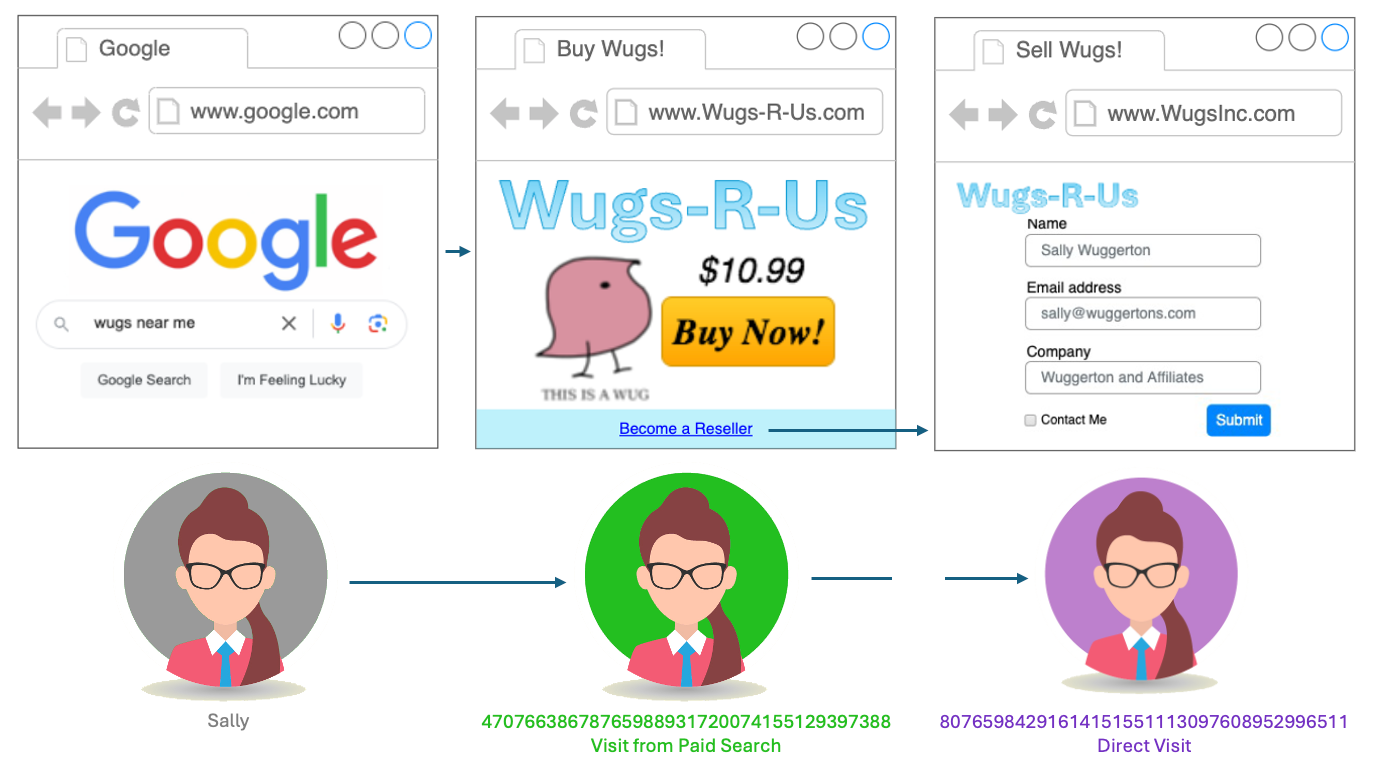
We either need to find a cookie that can be accessed from both domains, or we need to pass her identifier from site to site. (Or we need to talk to our site managers about how silly it is to have the sites on two separate domains, and team up with the SEO team to force them to migrate to a single domain.)
There are other situations where cross-domain tracking may be needed, like if you have an iframe showing content from another site (which has extra implications- see the FAQ).
You’ll notice I didn’t mention CNAMEs once in there- that’s because these days in this kind of situation, CNAMEs don’t do you much good. But there’s a good reason lots of people (especially people who have been in the space for a little while) still think the answer has to do with CNAMEs. (And Adobe’s documentation had perpetuated the misunderstanding for a long time, though they’ve done a great job in the last year of updating/clarifying).
A little history
Way back when I was young (in the days of H Code), Omniture set s_vi (“vi”, for “Visitor Identification”) cookies on its 2o7.net domain. Since no one’s domain matched that, these were 3rd party cookies everywhere. On one hand, this was great, because that meant that if you had 2 domains, both domains used the same 2o7.net cookie. But over time, more and more users blocked 3rd party cookies, and the dodgy-looking “2o7.net” was particularly susceptible to being blocked.
So Adobiture offered a solution: you could use a CNAME on your own domain that pointed to their domain. Now the cookie could be set at “metrics.Wugs-R-Us.com” (and that’s also where my beacons would be sent). If it were a secure site (https instead of http) then you’d want a CNAME with an SSL certificate (which Adobiture would help you set up)… so my non-secure traffic might go to metrics.Wugs-R-Us.com, and my secure traffic might go to smetrics.Wugs-R-Us.com. (Or stats.wugs-r-us.com, or whatever subdomains I chose. Sometimes folks did something like om.wugs-r-us.com– “om” for “Omniture”, which didn’t end up aging well.)
But now I had a problem, if I had multiple domains- I’d have a cookie with one visitor ID on smetrics.Wugs-R-Us.com, and another cookie with a different visitor ID on smetrics.WugsInc.com, just like we saw with Sally. So Adobiture said “you can use one CNAME on both sites”: both sites could use smetrics.Wugs-R-Us.com. This would only count as a first-party cookie on Wugs-R-Us.com, and as a “friendly” third-party cookie on WugsInc.com, which, because it was clearly related, would theoretically be rejected less than 2o7.net (but not by much- cookie blockers weren’t smart enough to say “these domains are likely owned by the same company”).
And then, around 2014, Adobe came out with the Visitor ID service: this set 1st party AMCV cookies by default, (though my beacons might still be sent to 2o7.net or, by then, the slightly-less-dodgy-looking omtrdc.net or adobedc.net). That’s right, Adobe has set first-party cookies, whether you had a CNAME or not, for over a decade. Folks might have continued using a CNAME for the “friendly third-party cookie” cross-domain effect (which we all pretended was a solution but never had high acceptance rates) or so their beacons would go to something friendlier-looking and less block-able. Or (in many cases) because they didn’t know their cookies were already first-party (which, even a decade later, is still a misguided reason people use CNAMEs).

In 2017, Apple rolled out ITP (“Intelligent Tracking Protection”) v1.0, making it so all third party cookies in Safari would expire after only 24 hours. This started the endless cycle of Whack-a-Mole that Apple is playing with the marTech industry. Fortunately, Adobe was already using first-party cookies (except for its demdex.net cookie, which we’ll get to later).
Then in 2019, Apple rolled out ITP 2.1: Apple started caring about whether cookies were created by JavaScript (such as Adobe’s Visitor ID service code), or if they came from a server via a header response. (These server-set cookies are often called HTTP cookies.) Apple basically said “cookies (even first-party ones) created by Javascript, rather than by a server response, are likely to be from MarTech trackers, and therefore we’ll cap their expiration at 7 days”. If a user went 7 days between visits to your site, they’d look like someone new.
This DID affect Adobe customers, because their first-party cookies were set (and accessible by) JavaScript. So now CNAMEs came en vogue again, because they allowed Adobe to use an HTTP cookie set by the CNAMEd server rather than the ones created solely by the visitorID JavaScript. But that only lasted until early 2020, when Apple’s ITP 2.3 started checking if domains were CNAMEs pointing to third parties. They saw right through our work-around. Which is how we got to where we are: CNAMEs do not help get around third-party cookie limitations (or ITP).
In fact, if your goal is cross-domain tracking, CNAMEs may be do more harm than good (remember, “friendly 3rd party cookies” are really just “3rd party cookies” and very blockable), unless you tweak some settings (see FAQ below). But CNAMEs are not entirely useless- they may still help get around ad blockers, and give you special Regional Data Collection options (that I don’t think I’ve ever seen used).
TL;DR: Your Analytics cookies are already first-party (though not in a way that Apple likes), CNAMEs will not help in cross-domain tracking, and Apple has already been capping your cookie expiration on Safari for 8 years (and yet the world continues to turn).
So what CAN I do to improve cross-domain tracking?
appendVisitorIdsTo
If we’re talking Analytics and not CJA, this is the strongest option, in my opinion, though it isn’t bullet-proof. The VisitorID service has an appendVisitorIdsTo() method which can pass a user’s MID along to another site by using query string parameters (if you’re using the WebSDK, appendIdentityToUrl is similar). On my Wugs-R-Us.com site, I would find anywhere I’m linking to WugsInc.com, and use this function to generate a string that I would append to the URL of the link. So instead of pointing Sally to https://www.WugsInc.com/sellingPartners/, I’d be sending her to https://www.WugsInc.com/sellingPartners/?adobe_mc=MCMID%3D46909414872626931751698850335382565846%7CMCORGID%3DDCF77919596885950A495D3E%2540AdobeOrg%7CTS%3D1719604554.
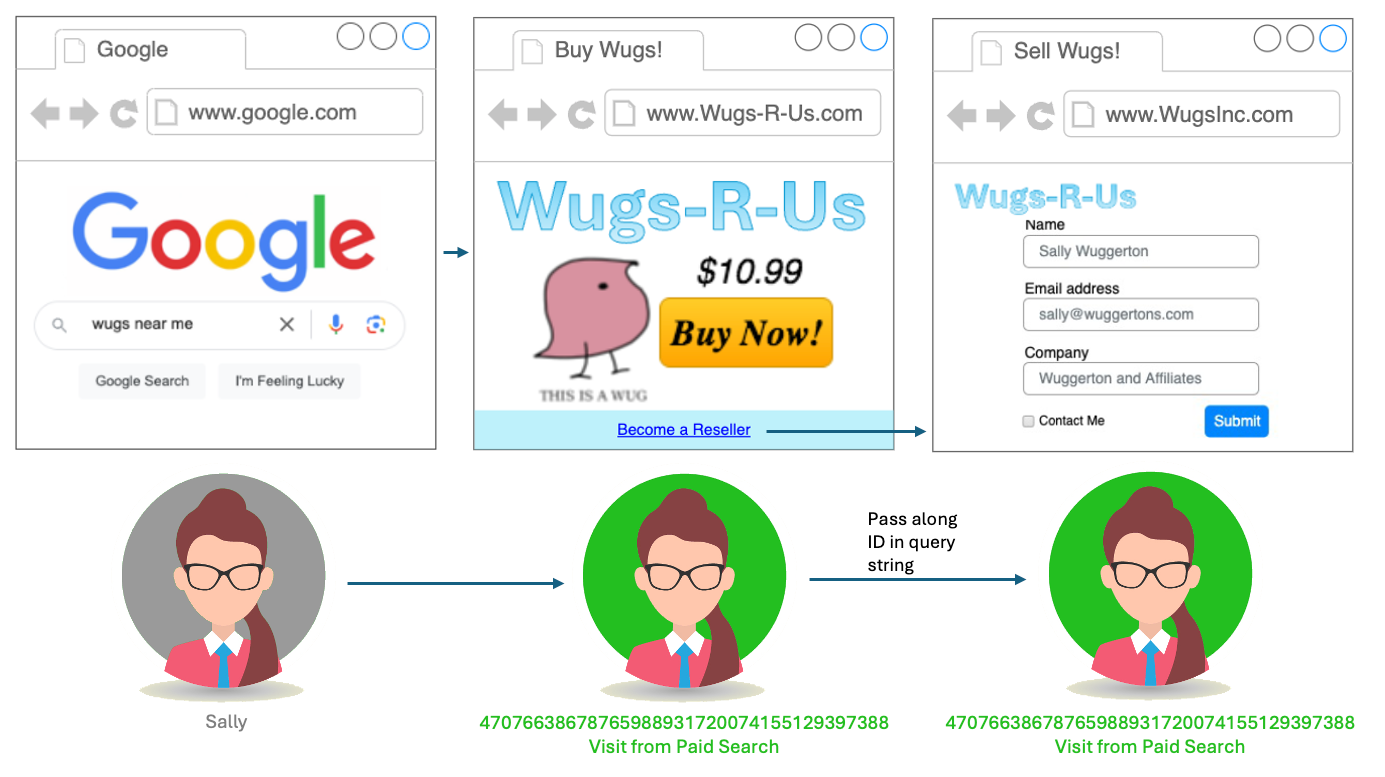
Since both sites have the VisitorID service and the same Adobe Org ID, the landing page would grab that query string parameter to create the ID for my AMCV and AMCVS cookies. (This is very similar to how you would pass the MID from a mobile app to the mobile web.) You can use my very old and extremely ugly test site to try this out to go between the 33sticks domain and my digitalDataTactics one.
For this to work, you’d need to find all the links on domainA that point to domainB (and vice versa) and actually change the href of them to dynamically add the query params. This could be a dev-heavy task… or you could use a plugin that will try to programmatically do it for you. Either way, there is some discovery and validation that needs to happen.
There are some catches to this approach:
Conflicting MIDs
If Sally had previously visited WugsInc.com and already had an AMCV cookie there (maybe she visited it from a social media post last week), then we have a possible conflict. By default, the passed-along ID would be ignored in favor of the already-existing WugsInc.com cookie, and Sally would look like two visitors, one with a history on Wugs-R-Us, and one with a history on WugsInc. I could change this via the overwriteCrossDomainMCIDAndAID setting in the VisitorID service. I’d need to decide which was more important: having Sally IDed as a single visitor, or having Sally tied to her history on WugsInc.com (where that social media post could get last-attribution credit for getting her to WugsInc.com).
Timestamp
At the end of that messy adobe_mc query string parameter is a timestamp. If I get to the landing page more than 5 minutes after that timestamp was generated, then the whole thing will be ignored. This is so if a user bookmarks the link, or passes it along to friends, we don’t make a mess of our IDs. Since it should never take more than 5 minutes between when a link is clicked and when the user lands, this shouldn’t be an issue, but in some situations it can cause unexpected results.
Browsing Behavior
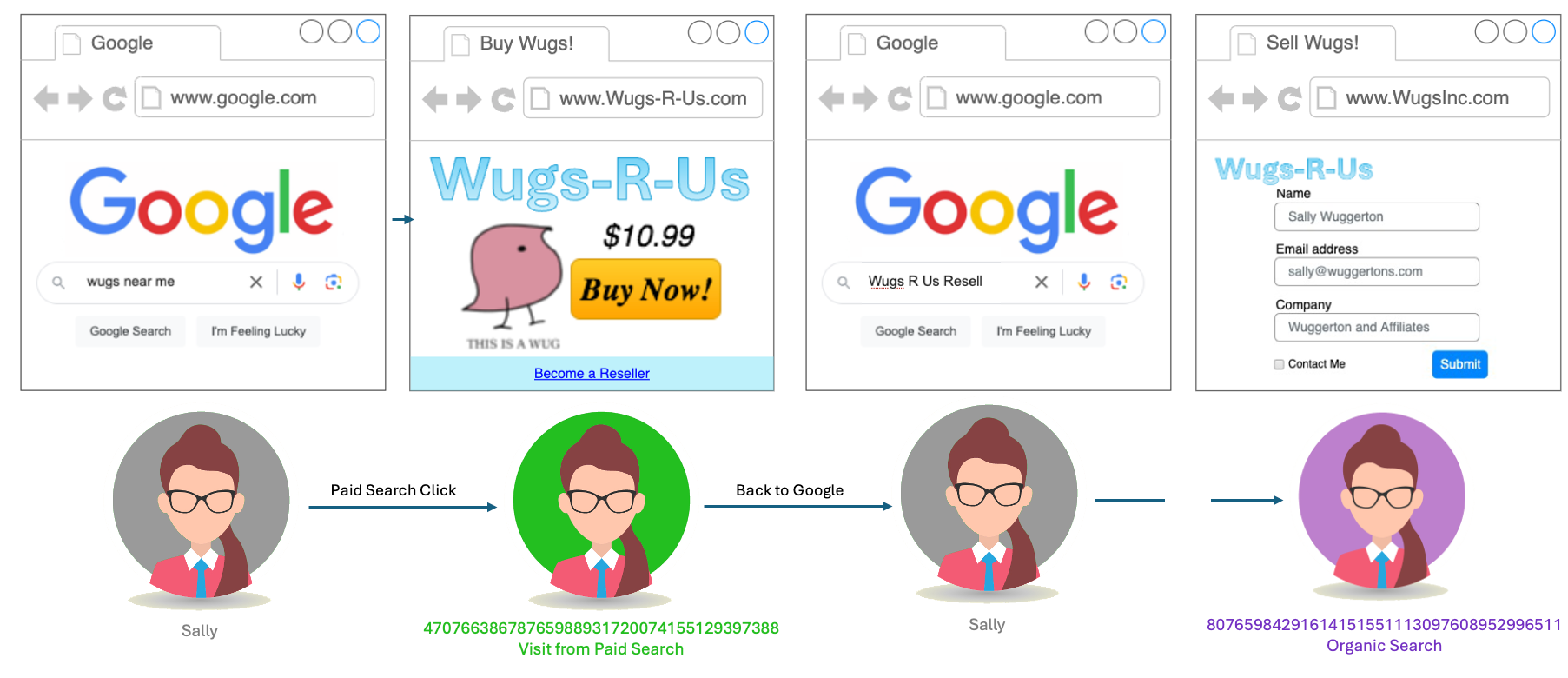
This is the main problem with the appendVisitorIDs approach: let’s say instead of finding a link to WugsInc.com on my poorly designed Wugs-R-Us site, Sally goes back out to Google and searches for “Wugs R Us Resell”, which points her directly to WugsInc.com. Because we don’t control the link taking her to the corporate site, we can’t append our query parameter to it. There’s nothing for it, Sally will look like two separate people (unless she accepts third-party cookies so the demdex cookie can help).
Adobe’s Remaining 3rd-Party Cookie: Demdex.net
There is one other cross-domain tracking tool in Adobe’s arsenal: the demdex.net cookie. (Demdex was the name of the company that Adobe acquired in 2011 that went on to become Adobe Audience Manager, as well as the basis for much of the Visitor ID service.) By default, when you use Adobe’s Visitor ID service, in addition to the first-party AMCV and AMCVS cookies, Adobe sets an extra third-party cookie on the demdex.net domain. This is tied to your Adobe Org ID. If I have this cookie in my browser, and travel to another site that has the same Adobe Org ID, the Visitor ID service will use that demdex cookie to derive the correct Marketing Cloud ID. Adobe walks through that process in detail in their documentation.
You can disable these cookies with the disableThirdPartyCookies setting in the Visitor ID service (not to be confused with the very dangerous disableThirdPartyCalls setting, which you could use on a portion of your site where you’d be 100% an ECID had already been created and stored in a cookie for that user).
As you can imagine, this demdex.net cookie has a very high chance of being blocked. Not only is it third-party, but it is on demdex.net, which has been flagged as a “known tracker”. It might be better than nothing, but would not be a reliable complete solution.
Server-Side Tag Management
Just kidding! Server-side Tag Management (or what Adobe calls “Event Forwarding”) won’t help with Cross-Domain tracking, or any of your other cookie woes. In all seriousness, while server-side tag management is often mentioned as a solution to the CookiePocalypse, it really doesn’t have much to offer in that regard.
I walk through what Server-Side TMSes can and can’t do at the end of my Privacy Theater presentation, but at a high level: when people say “Server Side Tag Management” in our space, they are often referring to what would more accurately be called “Client-to-Server Tag Management”: data collection still happens client-side, with JavaScript, within the user’s browser. What has changed is that now instead of sending your data to a bunch of different domains, you send all your data to one server, which then sends them along as needed. But the identifying of visitors still relies on JavaScript and Cookies.
Google’s Server-Side Google Tag Manager (sGTM) may or may not be able to help with cross-domain tracking, but it can help set more reliable first-party cookies, if you set it up to do so. This functions similarly to how we used CNAMEs- sGTM lives on a (often a Google Cloud Platform/GCP) server you own, which can be set on your domain. But Apple’s ITP is already gearing up to whack that mole: it now detects if the IP address of the thing doing the tracking (your GCP server) is different from the server hosting your site (presumably not GCP). Either way, Adobe doesn’t have a “self-hosted Event-Forwarding tracking server” option and cannot help with setting more reliable cookies… but does at least have a way where we can use our own HTTP cookies to seed the Adobe Visitor ID: First Party Device IDs.
Supply your own Identifier: Adobe First Party Device IDs
If you’re using the webSDK for your Adobe tracking, you may be able to use Adobe’s First Party Device ID functionality. The idea here is that you may already have a way to generate a more reliable identifier than what Adobe can offer. You can use your own identifiers (presumably stored in a HTTP cookie created by you, on your servers) to “seed” an Experience Cloud ID.
I don’t want to get your hopes up, because this solution relies on you having solved the problem EVERYONE is scrambling to solve: setting reliable identifiers on HTTP cookies (and even harder: sharing those identifiers between domains). But if you can sort that out, it would not only help your Adobe tracking, but also your client-side marTech tracking (like the Meta Pixel).
In truth, I think focusing on this issue (creating your own reliable identifiers) would do far more than, say, cookie audits, for most companies trying to navigate the CookiePocalypse.
DIY: Create a Proxy
The inimitable Frederik Werner has documented a way to accomplish what CNAMEs used to: using a proxy server. I don’t believe this helps specifically with the Cross-Domain tracking issue, but it DOES help set cookies that appease Apple’s ITP, and belongs in any conversation about using CNAMEs for Adobe Analytics tracking. There is a chance that at some point in the future Apple will try to see through it, but for now it’s the best way (or only way) to have the Visitor ID service use first-party HTTP cookies.
Fun fact: I don’t know for certain how they’ve set it up, but a certain massive technology platform (that is aggressively anti-tracking and has been the single biggest source of grief for data quality for many) uses Adobe Analytics, and they appear to do it behind a proxy or similar solution, so that tracking they block on other sites doesn’t get blocked on theirs. Hint: their brand name rhymes with “schmapple”.
Cross-Device Analytics (deprecated)
For a long while, if you had the “Adobe Analytics Ultimate” SKU, you could use Cross-Device Analytics (CDA), which allowed you to tie user behavior together across different devices (or in our particular case, across domains). This replaced your Unique Visitors metric with new metrics: People, Unique Devices, Identified people, Unidentified people, and People with Experience Cloud ID.
CDA did have many limitations (notably, it sent your “stitched” data into a Virtual Report Suite, had data delays, didn’t work with A4T, didn’t bring in Marketing Channels dimensions, etc). And it’d be a very expensive solution to use just for cross-domain tracking. These days, CDA has been deprecated, presumably to make room for Adobe Experience Platform’s Identity Service. I believe if you’re only on Analytics (not CJA) and still want identity-graph-like stitching, you’re out of luck, and the First Party ID functionality is the best you can get.
AEP’s Identity Service
CDA may have died, but the Identity Service has evolved and is now part of AEP/Customer Journey Analytics. Depending on your CJA SKU, you have two options: Field-Based stitching (using your own identifier, like a User ID, which works great if you have a high authentication rate on your site), or the newer and slightly-more-premium Device Graph, which can use a variety of identifiers to create a single user profile.
Identity Service is complicated, and this post is already too long, so I won’t go into great depth. Adobe has a LOT of documentation and Summit presentations, and good folks like Jake Winter at Adswerve have a nice summary already. I do want to call one thing out though: at the highest level: to set stitching up, you make sure you are sending the appropriate identifiers on all of the data you send to AEP, then you hand that AEP dataset over to Adobe’s engineers and they hand you back the same data set, but “stitched”. (I’m calling this out specifically because caused me some confusion when auditing a client’s data sets, because I couldn’t find the datastream/flow source of the “stitched” data set. It’s kind of a black box.) Edited to add- as of 2026, you now have visibility and control over setting up your own stitched data sets!
Other Cross-Domain Tracking Considerations
Plugins
There are a lot of plugins you can add to your Adobe Analytics implementation for common tracking use-cases. Some of them are just helpful utilities (like getQueryParam or formatTime), but many of them use first-party cookies to, say, get and persist a value from page to page, or keep track of the number of times a visitor has been to your site.
You can add plugins directly within your Analytics code (“s_code”) within the “doPlugins” method or, if you’re in Launch, using the Common Analytics Plugin extension (I much prefer not using the extension, if only for tighter control for consent). These cookies are set by JavaScript, and therefore have all the limitations of first-party Javascript-created cookies (which mostly comes down to: Apple/Safari will cap them at 7 days).
By default, the plugins that require cookies usually set them starting with “s_” (though usually you have the option to change the cookie name if you want). It’s not uncommon to see a lot of “s_” cookies on a site:
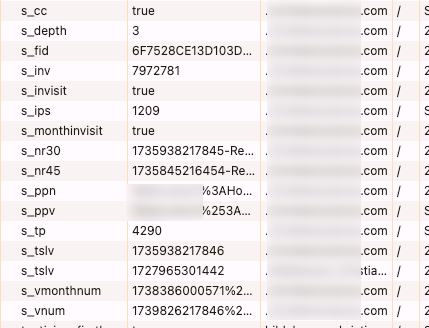
Some of those are created directly by Adobe, but most of them were added to the implementation for that org’s unique requirements. For those, the org needs to be careful that the cookies honor a user’s consent wishes (though arguably many of them wouldn’t need consent because they don’t contain identifiers or personal information… but users and lawyers don’t always appreciate those nuances).
The important (and relevant) thing to know here is that these do not have cross-domain functionality. They will be inherently unreliable if your data for a user crosses multiple domains. Accordingly, these cookies are not going to be as reliable as the ones used by Adobe to ID a visitor.
For instance, below, I have a report where the built-in Visit Number dimension is represented in the rows, and the first few values for the getVisitNum plugin is represented in the columns. There are a lot of “unspecified” (probably non-page-view beacons, but maybe an inconsistent implementation) but even aside from that… the plugin is getting “visit number 1” or 8%+ of visitors that Adobe says are on return visits.
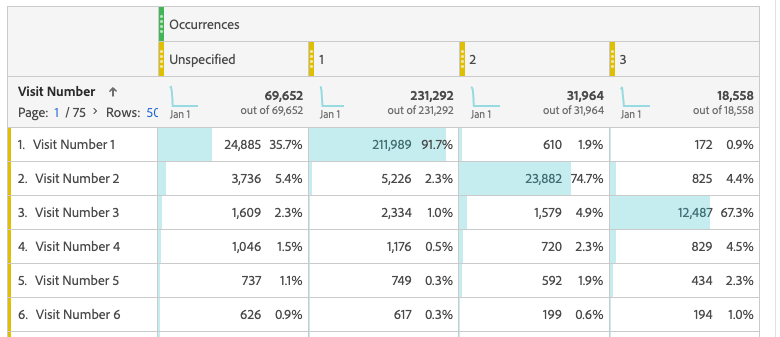
I recommend looking through your plugins and seeing what you might not need any more, or what requirements might have better ways of being met. Many (still widely-used) plugins now have out-of-the-box equivalents provided by Adobe, and only exist because the implementation is old, or because implementors like me are creatures of habit. For instance, getVisitNum existed before the “Visit Number” dimension was out-of-the-box (which also renders “getNewRepeat” obsolete). The very complicated channelManager plugin preceded Marketing Channels, getTimeToComplete/getTimeBetweenEvents has (in some cases) been replaced by “Time Prior to Event”, getVisitDuration can often be replaced by Time on Site, getValOnce can be handled within attribution settings, etc.
Consent Management
I’ve found that folks tackling cross-domain issues often don’t give much thought to the impact it could have to Consent Management. Let’s say Sally is based in the EU, where you can’t track until you have consent, and sees a consent banner on www.Wugs-R-Us.com. She grants her consent, and the Consent Management Platform stores her preferences in a first-party cookie. But then Sally moves on to www.WugsInc.com, which can’t access that cookie and will have to ask her for her consent all over again. Not the end of the world, but it’s an annoying user experience, and in some (rare) situations, can get you in legal trouble.
Some CMPs, such as oneTrust, do have a “solution” for this, but it once again relies on you already having a reliable identifier, such as a username or accountID, that crosses your sites.
Side note: third-party domains aside, if you’re using a platform like OneTrust, where you specify the domain where you want the cookie set, be careful about whether you are setting the top-level domain only (eg, Wugs-R-Us.com) versus a full hostname (eg www.Wugs-R-Us.com or shop.Wugs-R-Us.com). In most cases, you’d only want the top-level domain, so that when your user moves from www.Wugs-R-Us.com to shop.Wugs-R-Us.com, their CMP preferences move with them). With OneTrust, once you’ve set up that domain, you can’t change it- you have to set up a new one and therefore have new embed scripts.
Third-Party Tags
Even if you figure out how to do cross-domain identification for Analytics, there may be a whole other battle your org needs to tackle: third-party marketing tags (such as Meta, Adwords, Tradedesk, etc). It may be that the people who care about cross-domain tracking for Analytics are in a whole different department from the folks who care about cross-domain tracking for advertising and retargeting, but there is a lot to be gained by working together.
The main problem (both in Analytics and in marketing platforms) caused by users crossing domains is it messes with your attribution… which is a very big deal for marketing platforms. To understand why, you have to understand how advertisers use cookies to track conversions and build profiles- I recommend watching the middle portion of my Privacy Theater presentation (I promise I’m not trying to self-promote here, it’s just that the main reason I usually create content is usually just so I have something to reference for technical topics that come up a lot).
How to help advertisers create identifiers for users is a complicated topic, but I call it out here specifically because the solutions for all the different platforms have a lot of overlap. I’ve seen many folks use the Adobe ECID as an identifier for another platform, OR use another platform’s identifiers in Adobe tools. If you can just get one solid identifier, regardless of tool, you may be able to use it in a lot of different ways.
LocalStorage
LocalStorage, and it’s less-permanent friend, SessionStorage, are ways of storing information in a user’s browser- very similar to cookies, in fact. One big difference, though, is that cookies can be set at a top-level domain (eg, Wugs-R-Us.com) while localStorage and sessionStorage are set with the full hostname (eg www.Wugs-R-Us.com or shop.Wugs-R-Us.com). This means that while cookies have to worry about cross-domain tracking, localStorage has to also worry about cross-subdomain tracking.
If you are using identifiers in localStorage (for instance, I know Amplitude has a localStorage-based solution) then you need to be very careful about subdomains.
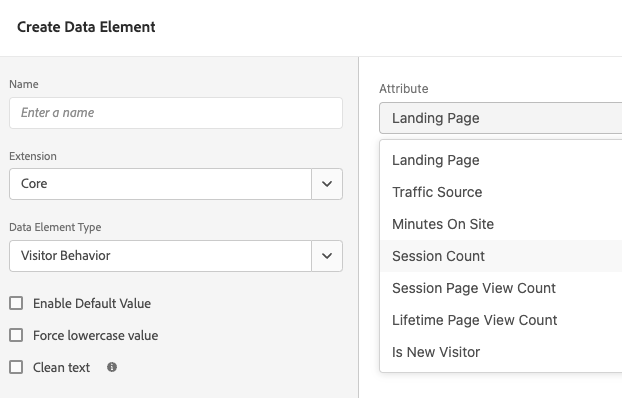
This can go beyond just identifiers too… if you use some of Adobe Launch’s built-in Data Elements, such as any of the Visitor Behavior ones (shown below), and your site has subdomains, you may be getting inaccurate data. For instance, “Landing Page” would store the first page I visited on www.Wugs-R-Us.com, but then be set separately with the first page I visited on shop.Wugs-R-Us.com.
Frequently Asked Questions (and/or questions that should be asked more frequently)
You keep using terms like ECID, MID, Visitor ID, AMCV… what’s the difference?
The important thing to know is that ECID, MID, “Visitor ID Service”, and visitorAPI.js are all the same thing. This confusion is on Adobe and their constant need to rebrand (although to be fair, this has been over the course of 20+ years.)
Context: as discussed above, before Adobe Analytics’s Visitor ID Service, there was the s_vi cookie, and optionally, the s.visitorID variable. Then the Visitor ID Service (no relation to s.visitorID) came along. That ID Service has been through some branding changes over the years: what is now (mostly) known as Adobe Experience Platform has, in the past, been known as the Adobe Experience Cloud and before that, the Adobe Marketing Cloud. (Oh! except now, as of March 2026, Adobe Experience Cloud has been rebranded to Adobe CX Enterprise.)
So what is known as the “Experience Cloud ID” (often shortened to ECID), which is set by the Experience Cloud Identity Service, is the same thing as the “Marketing Cloud ID” (which is why the parameter for it in your beacons is “mid”)… which uses AMCV cookies (presumably “Adobe Marketing Cloud Visitor”). And all of these are technically legacy cookies, as the webSDK uses kndctr_<orgId>_identity cookies.
And none of this should be confused with Adobe Experience Platform’s “Identity Service”, which is really different.
Sigh.
If Adobe’s Experience Cloud ID service inherently sets first party cookies, what does s.trackingServer do and how should I set it? – WIP
The variables s.trackingServer (which is fairly deprecated since nothing on the web is unsecure anymore) and s.trackingServerSecure used to define the domain your s_vi cookies would be set at, and where Adobe would send your beacon to. If you don’t set it, it would use your Report SuiteID (eg wugsrusprod.112.2o7.net) for both.
With the Visitor ID service, cookies are automatically set at your domain. But your beacon, by default, would continue using that old ugly 2o7.net domain (or perhaps the newer omtrdc.net or adobedc.net domains- though just now when I tested it on my site I got 2o7.net). This only really matters for ad blockers (and sometimes, site security policies). It’s also just not pretty. It probably has other implications I’m not aware of, as Adobe says setting s.trackingServer and s.trackingServerSecure is pretty much required.
If you are not using CNAMEs (because you realize your cookies are already first party, and CNAMEs don’t appease Apple), then you set trackingServerSecure to something like ‘orgID.data.adobedc.net’.
What do I do if I have an Iframe on my site with a different domain?
There are two things to consider for iframes: how do you track behavior within the iframe, and how do you make sure that behavior is tied to the same visitor as the rest of your visit? The latter is easy, if you can figure out the former.
If you control the site within the iframe, or have enough control to ask to have code added to it, then it’s pretty straight-forward: just add your TMS library to the page within the iframe. Then use appendVisitorIDs in the URL of the src of your iframe to pass the ECID to the iframe pages.
If you can’t add tracking to the site within the iframe, then you may be able to have them send information from the iframe to the parent page using postMessage. In this case, the tracking would technically take place on your site (and you might want to change s.pageURL to reflect the iframe’s URL), but you could at least get information about what is going on within the iframe. And since the tracking technically takes place on your domain and can use your existing ECID, you don’t have to worry about identifiers.
In some cases (like the most popular third-party-domain-iframe source, Youtube), the service within the iframe might provide an API to tap into, in which case you only need to set your tag manager up to listen for events from that API (or use an existing TMS extension). And again, since the tracking technically takes place on your domain, you don’t have to worry about identifiers.
Fun fact: if I set what would normally be a first-party cookie within an iframe (ie, the cookie’s domain matches the domain of the iframe page), but that cookie’s domain doesn’t match the parent page of an iframe, it counts as third-party. In other words, if your iframe’s domain doesn’t match the page that holds the iframe, all your iframe cookies will be blocked by Safari, Brave, and other sites.
How does Adobe decide which Identifier to use?
If your beacon has an “mid” parameter (aka an ECID), and an “fid” parameter, and an s_vi cookie attached, and a “vid” parameter, then it can be hard to know which one actually matters most. This can actually be very important for troubleshooting. Adobe’s documentation shows which ID “wins” in a fight:
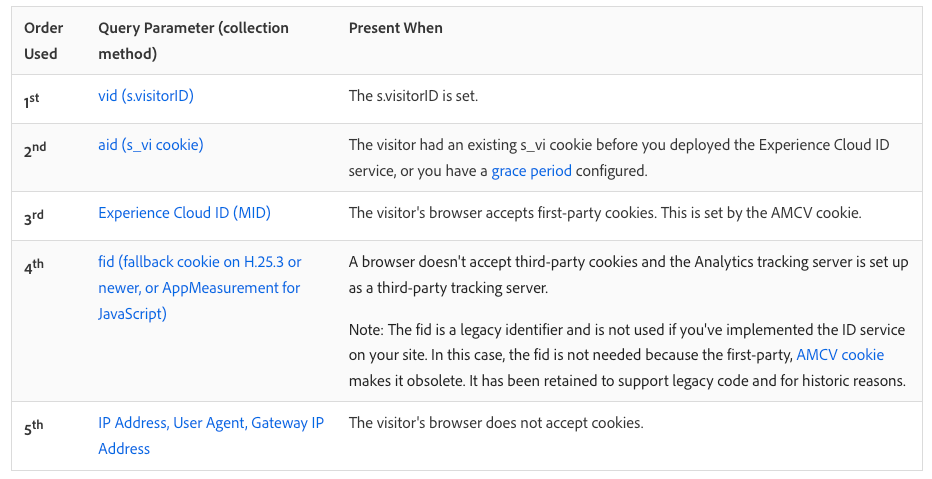
This can have catastrophic implications. For instance, if one small orphaned page of my site (we all have them, some landing page created by a different team years ago or somesuch) does not have the ECID service, it will set an s_vi cookie (and therefore an “aid”), which will then hang around and override this Experience Cloud ID for the rest of that visitor’s life. This is why, during the great Visitor ID Service migration of 2014-2016 (and even now, for folks who are really behind the times), Adobe encouraged folks who might have a split implementation (with some pages not yet on the Visitor ID service) to have a “grace period” where even their Visitor ID Service pages would continue setting an s_vi cookie.
If you see an “aid” parameter in your tracking, or s_vi cookie on your domain, you need to prioritize finding the page(s) responsible for setting it and make sure they’re using the same Visitor ID set up as the rest of your site. See Adobe’s docs for more thoughts and considerations around “migrating” to the VisitorID service (I put “migrating” in quotes because at this point, “migrating” means “finding old/errant implementations so 100% of your site is all using the same method).
(I saw this recently with a client’s Blueconic integration, which fires Adobe Analytics beacons all on its own and, at least in their case, ignored the Experience Cloud ID service. They were mostly saved by the fact that it sets the cookie at 2o7.net and therefore gets blocked by pretty much everyone.)
What about s.visitorID?
When it comes to supplying your own visitor identifier, you might ask “can we set s.visitorID?” And yes, technically you can, but it’s really not recommended and hasn’t been for a very long time, for a few reasons:
- It overrides every other identifier Adobe might try to use (as discussed in the previous question). Adobe has a lot of pretty good ways of IDing a visitor, all the way down to the last-resort, IP address. Can you do a better job than Adobe at IDing a visitor?
- s.visitorID can only be used by Analytics, so if you use other Adobe tools (like Target), it ruins your chance of using something like A4T or Shared Audiences.
- Login ID messes. If multiple people use the same login, or one users logs in on many machines, and you use that loginID to set s.visitorID, then you’re going to have a lot of confusing traffic all tied to the same “visitor”. (Note, this could be true with any solution based off an ID you provide.)
- This is the big one: you’d need to set the same visitorID on every hit ever received from that user. If an unauthenticated user comes to your site and for the first few pages, you use the ECID, then the user authenticates and you start using their loginID as a visitorID, it will bifurcate your visit: the hits without s.visitorID will be one person, and the hits with s.visitorID will be another.
If you want to use your own identifier, use the First Party ID service or the Identity Service described earlier in this post.
(The below sections are all obviously half-baked and unfinished- I’m sorry about that. Please see the note at the top of the post).
What good IS a CNAME? – WIP
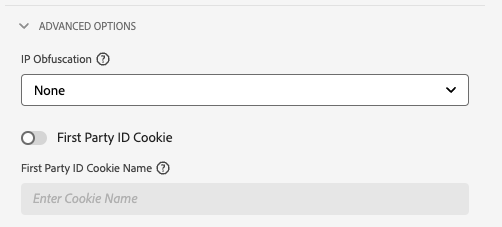
FPID:
What about the SameSite, Secure, and HttpOnly cookie settings? -WIP
If you are using CNAMEs to set “friendly” third-party cookies, then, well, you should probably stop, because those cokies are gonna be blocked for over half of users. But there are some tricks you can use to give them a slightly better chance.
If you need to set SameSite/Secure, you need a CNAME
This also has implications for iframe implementations.
https://experienceleague.adobe.com/en/docs/analytics/technotes/cookies/cookies#samesite-one-cname
How does the WebSDK handle cookies? – WIP
For now, you can reference the Adobe docs on how identity works with the webSDK, and how to share identity across domains with the webSDK
What about Regional Data Collection? – WIP
What’s up with the s_vi_yvx7Dx7Dzuvaxxfx7Digvx60gwve and s_ecid cookies? – WIP
See Also
Adobe’s newer documentation around how appMeasurement handles visitor identification
As you can see, it’s… complicated
Feeling overwhelmed? I don’t blame you. This post took me months (and many hours of research) to write, and I’m still sure I got something wrong (please chime in with suggestions). But I hope at least sections of this are useful to someone:).
**Special thanks to Russ Whitchurch at Adobe- first, for his help editing/updating this post. And second, for updating a lot of Adobe’s docs in the last year- when I started this post, it was in response to some errant documentation, but by the time I published it, Adobe had fixed the errors and removed a lot of the confusion!
Thanks for releasing this post, so much good info in one single place! Info that could only be learned the “hard way”. Looking forward to updates to this post.