Participation and Linear Allocation in Adobe Analytics- behavior I expected, and some I did not

I recently posted about some of the implications and use cases of using Linear Allocation (on eVars) and participation (props/events) and in my research, I thought I had encountered a bug in Analysis Workspace. After all, for this flow:

Page A Page B Page C Page D Newstletter Signup event (s.tl)
prop1
eVar1
events
“Page A”
“Page A”
“event1”
“Page B”
“Page B”
“event1”
“Page C”
“Page C”
“event1”
“Page D”
“Page D”
“event1”
“”
“”
“event2”

I saw this in Reports and Analytics (so far, so good):

But then in Analysis Workspace for that prop, trying to recreate the same report, I saw this, where the props were only getting credited for events that happened on their beacon (none got credit for the newsletter signup):

Basically, I lost that participation magic.

Similarly, for the eVar, I saw this report in Reports and Analytics:

And in Workspace, it behaved exactly like a “Most Recent” eVar:

Again, it lost that linear magic.

Calculated Metrics to the Rescue

With the help of some industry friends (thanks, Jim Kultgen at Kohler and Seth Burke at Adobe) I learned that this is not a bug, necessarily- it’s the future! Analysis Workspace has a different way of getting at that data (one that doesn’t require changing the backend settings for your variables and metrics).
In Analysis Workspace reports, allocation can be decided by a Calculated Metric, instead of the variable’s settings. In the calculated metric builder, you can specify an allocation by clicking the gear box next to the metric in the Calculated Metric Definition:

A Note On “Default” Allocation here

On further testing, in Analysis Workspace, it seems that eVars with the back-end settings of either “Most Recent” and “Linear” allocation are treated the same: both will act like “Most Recent” with a metric brought in, and both will act like “Linear” when you bring in a calculated metric where you specified to have Linear Allocation. One might say, if you use Analysis Workspace exclusively, you no longer would need to ever set an eVar to “Linear”.

“Default” does still seem to defer to the eVar settings when it comes to Most Recent or Original (just not Linear). So in an eVar report where the eVar’s backend setting is “Original”, whether I used my “normal” Newsletter Signups event (column 2), or my Calculated one with Linear Allocation (column 3), credit went to the first page:

So, the Calculated Metric allocation did NOT overwrite my eVar setting of “Original”.

So how do I replicate my Linear eVar report?

To get back that Linear Allocation magic, I would create a new Calculated Metric, but I would specify “Linear Allocation” for it in the Calculated Metric Definitions. Then I can see that linear metric applied to that eVar (the original metric in blue, the new calculated one with linear allocation in purple) :

Note that it’s 40-20-20-20, rather than 25-25-25-25. I’ll admit, this isn’t what I expected and makes me want to do more testing. I suspect that it’s looking at my FIVE beacons (four page views, one success event) and giving that Page D double credit- one for its page view beacon, and one for the success event beacon (even though it wasn’t set on that beacon, it WAS still persisting). So it isn’t perfectly replicating my R&A version of the report, but it is helping me spread credit out between my four values.

And my participation prop?

Similarly, with the prop, when I bring in my new “Linear Allocation” calculated metrics I just set up for my eVar (in blue), I now see it behave like participation for my Newsletter Signup metric, unlike the original non-calculated metrics (in green):

…but those Page View numbers look just Despite clearly remembering learning about it my first week on the job at Omniture in 2006, I realized recently that I did not have a lot of confidence in what participation and linear allocation would do in certain situations in Adobe Analytics. So I put a good amount of effort into testing it to confirm my theories, and I figured I’d pass along what I discovered.

First, the Basics: eVar Allocation

You may already know this part, so feel free to skip this section if you do. Allocation is a setting for Conversion Variables (eVars) in Adobe Analytics, with three options:

Let’s take a simple example to show what how this effects things. Let’s say a user visits my site with this flow:

Page A Page B Page C Page D Form Submit- Signup
s.eVar5=”Page A” s.eVar5=”Page B” s.eVar5=”Page C” s.eVar5=”Page D” s.events=”event1″

Most Recent (Last)

Most eVars have the “defaultiest” allocation of “Most Recent (Last)”, meaning in an event1 report broken down by eVar5, “Page D” would get full credit for the event1 that happened, since it was the last value we saw before event1. So far, pretty simple.

Original Value (First)

But maybe I want to know which LANDING page contributed the most to my event1s (there are other ways of doing this, but for the sake of my example, I’m gonna stick with using allocation). In that case, I might have the allocation for that eVar set to “Original Value (First)” so then “Page A” would get full credit for this event1, since it was the first value we saw for that variable. If my eVar is set to expire on visit, then it’s still nice and straightforward. If it’s set to never expire, then the first value we ever saw for that user will always get credit for any of that user’s metrics. If it’s set to expire in two weeks, then we’ll see the first value that was passed within the last two weeks.

This setting is frequently used for Marketing Campaigns (it’s not uncommon to see s.campaign be used for “Most Recent Campaign in the last 30 days” and then another eVar capture the exact same values, but be set to “Original Campaign in the last 30 days”).

Linear Allocation

If I’m feeling a bit more egalitarian, and want to know ALL the values for an eVar that contributed to success events, I would choose linear allocation. In this scenario, all four values would split the credit for the one event, so they’d each get one fourth of the metric:

(Though it may not actually look like this in the report- by default it would round down to 0. But I’ll talk about decimals later on).

So, that’s allocation.

Then what is participation?

Participation is a setting you can apply to a prop, so that if you bring a Participation-enabled metric into the prop’s report, you can see which values were set at some point before that event took place. Repeat: to see participation you must have a prop that is set to “Display Participation Metrics”:

And the metric you want to see needs to have participation enabled (without this, in the older Reports and Analytics interface, that event won’t be able to be brought into the prop report):

Unlike linear allocation for an eVar, participation for a prop means all the values for that prop get full credit for an event that happened. So, given this flow:

Page A Page B Page C Page D Form Submit- Signup
s.prop1=”Page A” s.prop1=”Page B” s.prop1=”Page C” s.prop1=”Page D” s.events=”event1″

You would see a report like this, because each value participated in the single instance of that event:

New Learnings (for me): Content Velocity

One thing these settings can be used for is measuring content velocity: that is, how much a certain value contributed to more content views later on. For instance, if I have a content site, and I want to know how much one piece of content tends to lead to the reading of MORE content, I might use a participation-metric-enabled prop with a participation-enabled Page View custom event, or I might use an eVar with linear allocation against a Page View custom event (whether or not the event has participation enabled doesn’t matter for the eVar). For my test, I did both:

Page A Page B Page C Page D
s.prop1=”Page 1″
s.eVar1=”Page 1″
s.events=”event1″
s.prop1=”Page 2″
s.eVar1=”Page 2″
s.events=”event1″
s.prop1=”Page 3″
s.eVar1=”Page 3″
s.events=”event1″
s.prop1=”Page 4″
s.eVar1=”Page 4″
s.events=”event1″

The prop

The prop version of this report would show me that Page 1 contributed to 4 views (its own, and 3 more “downstream”). Whereas Page 2 contributed to 3 (its own, and two more downstream), etc…

The eVar

Alternatively, the eVar would show me some thing pretty odd:

Those weird numbers don’t make sense on this small scale (how could 0 get 6.3%?), because it is rounding, and not showing me decimals. If I want to see the decimals, I can create a really simple calculated metric that brings in my custom Page View event (event1) and tells it to show decimals:

The report then makes a little more sense and show us where the rounded numbers came from (and how Page 4, with “0” Page Views, got 6.3% of the credit), but may still seem mysterious:

Those are some odd numbers, right? Here’s the math:

 Value Credit Why?   Explanation
Page 1 2.08 1+0.5+0.33+0.25 It got full credit for its own view, then half the credit (shared with page 2) for the event on Page 2, then a third of the credit (shared with Page 2 and Page 3) on Page 3…
Page 2 1.08 0.5+0.33+0.25 It only got half credit for the event that took place on its page (shared with Page 1), then a third of the credit (shared with Page 1 and Page 3) on Page 3, etc…
Page 3 0.58 .33+.25 It only gets a third of the credit that took place on its page, and a quarter of the credit for the fourth page.
Page 4 0.25 0.25 The event that happened on this page is shared with all four pages.

Crazy, right? I’m not going to tell you which an analyst should prefer, but as always, you should ask the question: “What will you DO with this information?”

What happens when multiple values appear in the same flow?

Let’s say the user does something like this, where they hit one value a couple page views in a row (Page B in this example), or they hit a value 2 separate times (Page A in this example):

Page A Page B Page B
(again)
Page C Page D Page A
(again)
Conversion event
prop1
eVar1
events
“Page A”
“Page A”
“event1”
“Page B”
“Page B”
“event1”
“Page B”
“Page B”
“event1”
“Page C”
“Page C”
“event1”
“Page D”
“Page D”
“event1”
“Page A”
“Page A”
“event1”
events=”event2″

For the prop, it’s pretty straightforward. This will look like 6 event1s, where Page A gets value for all 6, and Page D gets credit for just 2 (itself, and the Page A that came afterwards):

For the eVar, it gets a little more complicated (I added in a calculated metric so you can see the decimals). Page A (accessed twice at separate times) got double credit for the conversion (which I might have predicted), but Page B (accessed twice in a row) ALSO gets double credit for the conversion (which I didn’t predict, probably because I’m too used to thinking in terms of the CVP plugin):

Caveats

A couple things to be aware of:

  • Settings for participation and allocation don’t apply retroactively- you can’t apply them to existing data. If you want to start using it, you need to change your settings and you’ll see it applied to future data. However, this can mess with existing data, so be careful.
  • Analysis Workspace does some unexpected behavior for both participation and allocation. I’ll have a followup post on that.

Conclusion

Both participation and linear allocation aren’t used often, but they can uniquely solve some reporting requirements and can provide a lot of insight, if you know how to read the data. I hope my experimentation and results here help make it clearer how you might be able to use and interpret data from these settings. Let me know if you have other use cases for using these settings, and how it has worked out for you!like linear allocation in an eVar would (2.08, 1.08, .58, .25), not the nice clean numbers (4, 3, 2, 1) I’d get for a prop with participation. At this point, I still don’t have my Content Velocity prop report, but I’m getting closer.

So how do I get my Content Velocity?

Analysis Workspace has a “Page Velocity” Calculated metric built into its Content Consumption template, which reports the same data as my Content Velocity (participation-enabled) prop did in Reports & Analytics.

 If I want to recreate this calculated metric for myself, I use the formula “Page Views (with Visit Participation)/Page Views”:

Though my friend Jim Kultgen suggested a metric he prefers:

((Page Views 'Visit Participation')/(Visits))-1

This shows you how a page contributed to later page views, discounting how it contributed to itself (because obviously it did that much- every page does), and looking at visits to that page (so repeat content views don’t count for much).

These two calculated metrics would show in an AW report like this:

Conclusion

If I use Analysis Workspace exclusively, I may no longer need to enable participation on metrics or props- I could just build a Calculated Metric off of existing metrics, and change their allocation accordingly, and that would work the same with either my eVars or my Props.

Knowing a few of these quirks and implications, I can see a future with simpler variable maps (no more need for multiple eVars receiving the same values but with different allocation settings) and the ability to change allocation without tweaking the original data set (my “Newsletter Signups” metric retains its original reporting abilities, AND I can build as many Calculated Metrics off of it as I want). I’m excited to see how Adobe will keep building more power/flexibility into Workspace!

Quick poll: What should I tackle next?

Each new year, I tend to dive into some new side project (this is how the Beacon Parser and the PocketSDR came about). I have quite a few things I want to tackle right now, and one main thing I’m slowly plugging away at, but in the meantime, I’m wondering what to prioritize. So, a poll:

Any other ideas (or desired improvements to existing tools)? Let me know in the comments.

New tool: PocketSDR Mobile App for Adobe Analytics

I mentioned in my previous post that one of the reason I’m going “independent” is to have more time to work on products and pet projects. One of those ongoing projects of mine has been a mobile app you can use to keep your Adobe Analytics SDR/Variable Map easily accessible on your phone.
   
Get it on Google Play
The first release of this actually went out in August 2016, but I didn’t let anyone know because I felt it was still too “beta” and I wanted to clean it up before making it more publicly known. A year and a half later (and various framework upgrades that required redoing the whole thing… each time learning and applying those learnings), I got it to a point where I don’t feel ashamed to share it, though of course there is always room for more improvement.

To use the app, you will need your Adobe Analytics Web Services API key. And since no one wants to enter their 32-digit API Key into their mobile device, this newest version of the app allows you to enter your API key on the web (meaning you can copy-and-paste on your desktop machine) then get a link that will allow your mobile device to open the app with those credentials already entered. I highly recommend using that API Shortcut tool before diving into the app.

I created the app for a few reasons:

  • As with the beacon parser, the main reason was because I wished a tool like this existed and figured if I was going to make it for myself, I may as well let other people use it too.
  • I have a web development background, and wanted to learn more about developing for Mobile Apps. I’ll admit on this front, I cheated a bit: rather than learning multiple native app languages (like Swift or C++), I used the Ionic Framework, which let me program the app using Angular (which fits with my JS/HTML background better than native languages), then use Cordova to turn it into a Mobile App. Still, I did get to learn a lot about mobile development in general, analytics options within mobile, and the release cycle for mobile development (I can’t just save a file and FTP it to my server), not to mention Angular 1/2 and typescript.
  • I needed a situation in which I could test out analytics tracking in various Single-Page App scenarios (yay Angular).
  • Because at heart, I am a developer. While I enjoy helping clients sort out governance and documentation issues, sometimes I just want to retreat to my basement and do some coding, for that straight-forward validation of seeing your code work in real-time. It’s good to keep those skills alive.

All in all, I learned so much. And I’ve already used the app quite a bit to keep track of my client’s Variable Maps (“what did we use event40 for? Oh yeah!”) However, I’m not a professional mobile developer, and this project was done entirely in my evenings/PTO as a learning exercise that happened to create a useable product. So please be forgiving of any thing in the app that is less-than-ideal; there is a reason I’m not charging for the app at all. I will continue working on improvements, particularly with an eye for performance (I’m looking at you, Android….) and I’m already aware of potential aesthetic issues on iPhone X. Please let me know of any other feedback or suggestions- I’d love to hear what you think!

P.S. Before anyone asks why I didn’t use the Adobe API OAuth2 Authentication, I thought about it, and may yet move to using that, but have concerns about how that works for marketing cloud AND non-marketing cloud logins. That, and the API documentation is… lacking… so I decided for now to stick with what I know. If anyone has experience with OAuth2 authentication and wants to discuss, please reach out. 

P.P.S. A special thanks to my beta testers!

Exciting News: Self-Employment!

Bilbo Going on an Adventure

I’ve finally made the leap, and am now consulting as my own independent entity. I’ve worked at many wonderful consulting agencies over the years and happily still have a good relationship with each of them, but for some time now I’ve wanted to move more and more into building products. Unfortunately, thus far no one has wanted to hire me as a junior Product Manager or Developer for anywhere near the same salary I’ve been getting as a Principal Consultant, so in order to pursue my product dreams, I needed to reduce my commitment to consulting and find a more flexible arrangement.
I will continue consulting, because I want to stay informed and have current practical experience with implementation (plus I got to keep paying my bills). But without an agency as a “go between”, I can work fewer billable hours and have more time to work on products and projects. Don’t get me wrong: agencies as a “go between” provide a lot of value: I won’t pretend to not be daunted by marketing, sales contracts, benefits and taxes. But thus far, it’s been a great growing experience for me. And I’m lucky to have a very supportive network as I branch into the unknown.

So now I have a chance to work on some other projects, like fixing up/modernizing the beacon parser, and other projects I’ll post about shortly (stay tuned!) I’ll also continue working with Cognetik for a few exciting initiatives they have going on, so you will see me on their blog still occasionally. And there are some other agencies I’m eager to work with still if it doesn’t interfere with my product dreams, so this may or may not last long.

I already have a good amount of independent work to keep me busy for the next few months, so this post isn’t me necessarily soliciting for more work (unless you happen to have the PERFECT project for me, in which case, let’s talk!) But if you want to talk about products and opportunities, please reach out! I’m now at jenn@digitalDataTactics.com.

Adobe DTM Launch: Improvements for Single Page Apps

For those following the new release of Adobe’s DTM, known as Launch, I have a new blog post up at the Cognetik blog, cross-posted below:

It’s finally here! Adobe released the newest version of DTM, known as “Launch”. There are already some great resources out there going over some of the new features (presumably including plenty of “Launchey Launch” puns), which includes:

  • Extensions/Integrations
  • Better Environment Controls/Publishing Flow
  • New, Streamlined Interface

But there is one thing I’ve been far more excited about than any other: Single Page App compatibility. I’ve mentioned on my personal blog some of the problems the old DTM has had with Single Page Apps:

  • Page Load Rules (PLRs) can’t fire later than DOMready
  • Event-Based Rules (EBRs) and Direct Call Rules (DCRs) can’t “stack” (unlike PLRs, there’s a 1:1 ratio between rules and analytics beacons, so you can’t have one rule set your global variables, and another set section-specific variable, and another set page-specific variables, and have them all wrap into a single beacon)
  • It can be difficult to fire s.clearVars at the right place (and impossible without some interesting workarounds)
  • Firing a “Virtual Page Load” EBR at the right time (after your data layer has updated, for instance) can be tricky.

So much of this is solved with the release of DTM Launch.

  • You can have one rule that fires EITHER on domReady OR on a trigger (Event-based or Direct Call).
  • You have a way to fire clearVars.
  • You can add conditions/exclusions to Direct Call rules

There are other changes coming that will improve things even further, but for now, these changes are pretty significant for Single Page apps.

Multiple Triggers on a Single Rule

If I have a Single Page App, I’ll want to track when the user first views a page, the same as for a “traditional” non-App page. So if I’m setting EBRs or DCRs for my “Virtual Page Views”, I’d need to account for this “Traditional Page Load” page view for the user’s initial entry to my app.
In the past, I’d either have a Page Load Rule do this (if I could be sure my Event-Based Rules wouldn’t also run when the page first loaded), or I could do all my tracking with Event-Based Rules, and I’d have to suppress that initial page view beacon. I may end up with an identical set of rules- one for when my page truly loads, and one for “Virtual Page Views”.

Now, I can do this in a single rule:

Where my “Core- Page Bottom” event fires when the page first loads (like an old Page Load Rule):

…and another “Page Name Changed” event that fires when my “page name” Data Element changes (like an old Event-Based Rule):

No more need to keep separate sets of rules for Page Load Rules and Virtual page views!

Clearing variables with s.clearVars()

Anyone who has worked on a Single Page App, or on any Adobe Analytics implementation with multiple s.t() beacons on a single DOM, has felt the pain of variables carrying over from beacon to beacon. Once an “s” variable (like s.prop1) exists on the page, it will hang around and be picked up by any subsequent page view beacon on that page.

Page 1

Page 2

Page 3

Page 4

s.pageName

Landing

Search Results

PDP > Red Wug

Product List

s.events

(blank)

event14

prodView

prodView

s.eVar1 (search term)

(blank)

Red Wug

Red Wug

Red Wug

My pageName variable is fine because I’m overwriting it on each page, but my Search Term eVar value is hanging around past my Search Results page! And on pages where I don’t write a new events string, the most recent event hangs around!

In the old DTM, I had a few options for solving this. I could do some bizarre things to daisy-chain DCRs to make sure I could get the right order of setting variables, firing beacons, then clearing variables. Or, I could use a hack in the “Custom Code” conditions of an Event-Based Rule, to ensure s.clearVars would run before I started setting beacons. Or, more recently, I could use s.registerPostTrackCallback to run the s.clearVars function after the s_code detected an s.t function was called.

Now, it’s as simple as specifying that my rule should set my variables, then send the beacon, then clear my variables:

Directly in the rule- no extra rules, no custom code, no workarounds!

Rule Conditions on ALL Rule Types (including Direct Call)

If I were using Direct Call Rules for my SPA, in the past, I’d have to account for Direct Call Rules having a 1:1 relationship with their trigger. If I had some logic I needed to fire on Search Results pages, and other logic to fire on Purchase Confirmation pages, I could have my developers fire a different “_satellite.track” function on every page:

Then in each of those rules, I’d maintain all my global variables as well as any logic specific to that beacon. This could be difficult to maintain and introduces extra work and many possible points of failure for developers.

Or, I could have my developers fire a global _satellite.track(“page view”) on every page, and in that one rule, maintain a ridiculous amount of custom code like this:

This would take me entirely out of the DTM interface, and make some very code-heavy rules (not ideal for end-user page performance, or for DTM user experience — here’s hoping your developer leaves nice script comments!)

Now, I can still have my developers set a single _satellite.track(“page view”) (or similar), and set a myriad of rules in Launch, each using that same “page view” trigger, but each with a condition so you can set different variables in different rules directly in the interface when your developers fire _satellite.track(“page view”) on your Search Results versus when they fire _satellite.track(“page view”) on your Purchase Confirmation page:

I’d love to say all my SPA woes were solved with this release, but to show I haven’t entirely drunk the Kool-aid, I will admit some of my most wished-for features (and extensions) aren’t in this first release of Launch. I know they’re coming, though- future releases of Launch will add additional features that will make implementing on a Single Page App even simpler, but for now, it still feels like Christmas came early this year.

Adobe DTM Launch

I’m at Adobe Summit this week, and eagerly awaiting more public news about the new iteration of DTM, officially named “Launch”. Follow the updates on the Cognetik blog for updates as I can share them!
And if you are at Summit and want to meet up, drop me a line!

Coming to Adobe Summit 2017

adobe-su-1024x454I’ll be at Adobe Summit in Las Vegas next week, Monday March 19th through Friday March 24th. If you happen to be out that way, shoot me a comment here and hopefully we can meet up! I’ll be attending a lot of the DTM sessions and will be ready to help folks understand what the DTM updates mean for them.
I’ll also be presenting at Un-Summit at UNLV on Monday, speaking about Marketing Innovation and Cognetik’s new tableau data connector. Come check it out!

Building a Strong Analytics Practice: #3- Putting Processes in Place

This post was originally posted on the Cognetik blog as part of a series on Building a Strong Analytics Practice.

An analytics practice has some unique challenges as far as project management goes. They are accountable for delivering quality data, but there are many elements out of their control:

  • once you deliver technical specifications, you have to “hurry up and wait” until developers have questions or are ready for validation
  • documentation and validation often happen on “moving targets”, where the site map or functionality may be in flux right up until they are released
  • release cycles rarely include a window of time with a stable site for the Analytics team to perform validation
  • projects rarely exist in a vacuum- they usually need to meld with a global solution which is itself often a work-in-progress
  • an analytics project may involve many deliverables, with many audiences:
    • Site Map/wireframes
    • Business Requirements for reporting
    • Solution design
    • Technical Specifications for IT
    • TMS Engineering
    • IT Implementation
    • IT QA/Validation
    • Report QA/Validation
    • Push to production
    • Distribute reports, provide insights, and take action

Without an official process or flow in place, it can be easy for things to slip through the cracks.

Because of these external variables, both Agile/SCRUM and Waterfall methodologies have some major drawbacks. You may need to be writing technical specifications before a design is complete; taking an iterative approach may be too resource-intensive; the analytics team may not be deeply embedded enough to collaborate with developers in real time. Some of these difficulties can be alleviated by improving communication within your org, as discussed in the second post in this series, but the most significant thing you can do to help streamline your initiatives is to have an established process in place, to be sure that all the necessary tasks are completed in the right order by the right people. You may not be able to always adhere to it, so plan on some flexibility, but it can be a good exercise to merely look at your process and document “this current project is an exception because [fill in reason] and we’re going to account for the deviation from our process by [fill in alternative]”.

Take this example user flow. In grey are examples of deliverables or decisions following a single sample reporting requirement (track a new form’s ID):

When visualized in this way, it may become easier to establish what kind of timelines you need when working with developers, clarify who is going to update the global documentation, or ensure that QA/validation procedures are followed. Cognetik can help set up and document these governances practices, but we’d also love to hear from you what you’ve found works well, or what struggles you’ve encountered.

Building a Strong Analytics Practice: #2 Connecting your Organization

This post was originally posted on the Cognetik blog as part of a series on Building a Strong Analytics Practice.

Once you have clear ownership within your core team, you need to get a global view of how data is used at your company. Once you’ve accounted for all the different moving pieces, it can be easier to:

  • Communicate clearly to the right people
  • Represent your team’s priorities to the rest of the org
  • Involve the right people in relevant decision-making processes
  • Have the right scope when planning new projects
  • Get more use out of your data by increasing its audience
  • Ensure that org-wide critical tasks and relationships have clear ownership within your Core Team
  • Keep leadership informed about the value your data provides, and the level of effort it takes to maintain it
  • Enlist resources to fill in gaps in your organization

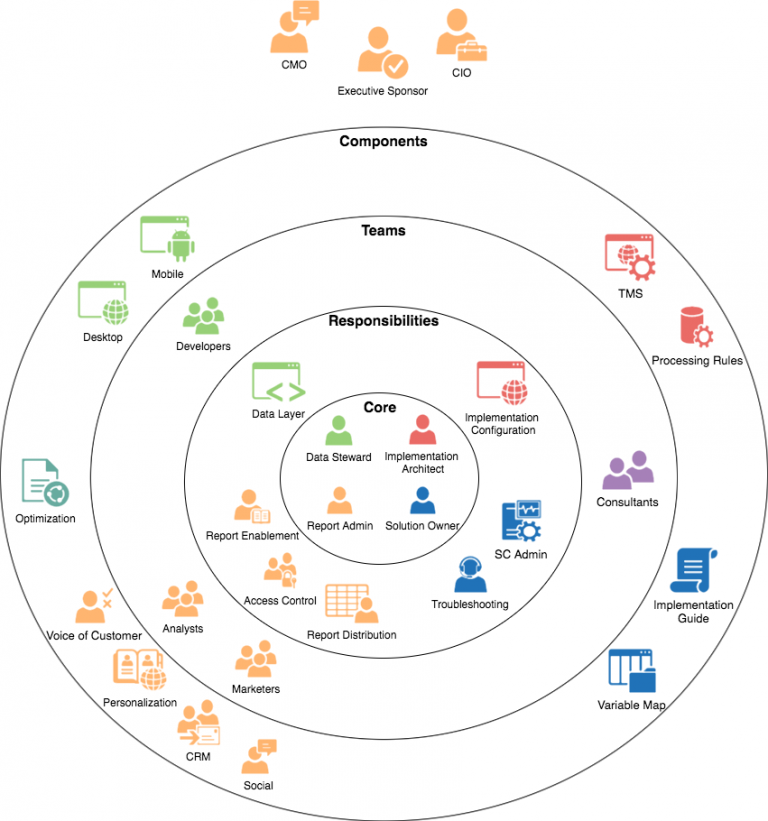
To do this, I recommend mapping out the rest of your ecosystem. This will help break down those silos and give the individuals at your company who use the data the direction and support they need to get value out of the data.

Map out your ecosystem

This task can be surprisingly revealing, and may require some creative thinking. First, map out the obvious ones: marketers, analysts, developers and consultants. Don’t forget personalization, optimization, web development, privacy, project managers, data scientists, product owners and so on. Make sure to include executive sponsors and leadership.

List your company’s data tools

Next, list out the tools your company uses that touches data: your digital analytics tool of choice (Adobe or Google Analytics for instance), Optimization (eg Adobe Target or Optimizely), Content Management (eg Demandware), Customer Relationship Management (eg Saleforce), marketing (eg Kochava, Floodlight, Adwords), User Experience (eg Clicktale), Voice of Customer (eg ForeSee, Opinionlab)… feeling overwhelmed yet? Don’t worry, you can use this as a sort of head start:

Define responsibilities for each point of contact

For each component, figure out a point of contact- for instance, for your CRM, who will your Core team be working with? Reach out to the appropriate parties in your org. At bare minimum, send them an email, highlighting how they fit into the “Big Picture” for data at your company. If you are just now establishing a governance model, it may be worthwhile to even schedule a quick touch-base with each key person/team in your ecosystem to:

  • Make sure they know how they fit into the bigger Data-driven scheme and seek out feedback for what they’d love to get out of analytics
  • Establish who on your team is their main point of contact. Encourage them to keep you in the loop for any changes they are aware of that might impact (or benefit from) analytics
  • Ensure they have access to tools and resources (like variable maps or documentation on processes) in some centrally-located repository (like Sharepoint, Confluence, or Google Drive if need be)
  • Establish reasonable expectations and scope on new initiatives. If they understand that you have a queue for analytics initiatives, and a process to follow that may take __ weeks/months to change the solution or kick off something new.
  • Give them visibility into the type of work you currently have on your roadmap and how that fits into company priorities.
  • Ask if there are any areas in the company not currently using analytics that might get value out of being included in these conversations.

You may or may not want a regular meeting with them, but it’s important to make sure the relationship always exists, that they see the active role Analytics has in your org, they feel involved, and have a clear line of communication with you.

“Mapping takes too much of our time!”

I understand that this may require an investment of resources to get up and running, and that it may exceed the current scope of analytics at many companies. But, similar to establishing a strong data core team, this upfront investment of time and resources will, at bare minimum, help a company get more value out of its data, and may actually reduce the amount of resources needed in the long run. Establishing communication and relationships will give focus to analytics initiatives, reduce rework, and include analytics in conversations sooner (getting rid of the pre-release scramble to get analytics added and validated).

Building a Strong Analytics Practice: #1- Your Core Team

This post was originally posted on the Cognetik blog as part of a series on Building a Strong Analytics Practice. 

Imagine this conversation:
Joe: “I just got the wireframes for the new site filtering tool. We need an analytics BRD and Tech Spec so developers can begin work.”
Anna: “But my team of developers is working on a priority project through November then goes into 3-month code freeze!”
Joe: “K, well, this new site feature is also a priority, and we need tracking on the new filtering tool. “
Mike: “Our reporting needs to focus on the KBOs that just came down from the top. How does the new filtering tool relate to conversions? What business decisions can we make if we know it’s being used?”
Susan: “Speaking of, we know that conversion tracking on mobile is broken- has been since September. Can we prioritize getting THAT fixed?”
Dan: “But, we’ve been grading our personalization efforts using that report! We need to get that fixed, like… yesterday!”

As painful as that conversation feels, can you imagine how much more painful it is in places where those conversations are NOT happening? I know that no one wants more meetings in their schedule, but a regular, FOCUSED check-in between key stakeholders can make all the difference. But who should attend such meetings?

We’ve seen a lot of value in establishing an Analytics Model- some folks may call it a Center of Excellence (CoE), for others it may still just be called the “analytics team”. Whatever you call it, the important thing is to really think out the roles, goals, processes, and responsibilities so that this team- and their data- can really drive the conversation, rather than “be driven”. I’m going to call this the Data Core Team.

To start, figure out who is going to be on your Data Core Team. I’ve seen this filled by a single person, and I’ve seen a team of 6 or more. Either way, with however many people you have, you’ll need to fill these roles:

Solution Owner

The Solution Owner is the “business requirements” gatekeeper. Their world is one of Key Business Objectives (KBOs) and Key Performance Indicators (KPIs). They:

  • gather reporting requirements
  • give focus to the solution by running reporting requests through a value-driven filter, prioritizing work that will provide truly actionable data to their organization
  • interface with executives, product managers, and analysts to make sure their data practice aligns with their company’s business objectives and roadmap
  • work with the Implementation Architect to design a solution that will suit their reporting needs
  • are in charge of keeping implementation documentation in a centrally-accessible place

Implementation Architect

The Implementation Architect owns the technical side of the solution. The Solution Owner says if something is worth tracking; the Implementation Architect figures out how to make it happen. They:

  • know the tools of their trade- for instance, for an Adobe Analytics implementation, they’d know when to use an eVar instead of a prop, or how to set the products string. For a Google Analytics implementation, they know when to use an event or a custom metric, and the best practices behind event categories, actions and labels
  • make decisions and enforce standards for variable maps and data architecture. Often, the decisions they make are a bit arbitrary- for most folks, it doesn’t REALLY matter if you identify your pageName in a JavaScript object named “digitalData.page.pageInfo.pageName” or in “universal_variable.navigation.page”, or if you use eVar41 or eVar42- the important thing is that someone is in a position to make that decision and keep it standard.
  • administer any Tag Management Solution their company uses, perhaps just controlling access and settings standards, or perhaps going so far as to be the editor and publisher of changes.
  • work with the Data Steward to document what is needed from site developers.

Data Steward

The Data Steward works with site developers to apply the analytics solution to the site. As the person charged with owning the data for your site(s), they have more of a technical understanding of analytics and how it fits into site development. They:

  • may not be a developer themselves, but they need to understand the processes developers use, the overall way the site works, and to be able to make informed decisions about data layers, tag management, JavaScript frameworks, SDKs…
  • work closely with the Implementation Architect to design and deploy a solution that works, given your site’s architecture and developer resources.
  • interface with site engineers and developers and represent their interests to the rest of the Core Data Team.
  • own Data Quality- they run the QA processes and help maintain implementation health with regular audits.

Report Administrator

The Report Administrator does a lot of the housekeeping needed to get data to the end users within their org. They:

  • interface with the report users, ensuring they have the access and training they need
    distribute reports, create logins, and provide access to training
  • may serve a PM role within the Data Core team, keeping track of upcoming initiatives and timelines.

Conclusion

I’d say it’s rare for these responsibilities to actually be split among 4 people as I’ve described here. The important thing is that you have clear ownership of each responsibility, and that this Core Team works closely together as the single source of the “Big Picture”.

Each role may need to pull on other resources freely- for instance, if your company doesn’t have an Adobe Analytics implementation expert, then your Implementation Architect may hire outside consultants to help them. I’d say in general, this doesn’t mean outsourcing the OWNERSHIP of your implementation architecture- each company still needs an internal resource with motivation and access to resources to move the solution in the right direction. No matter how excellent your consultants are, they will never be able to own your implementation as well as someone internal could. A good consultant, however, will support that internal resource, providing industry knowledge and guidance, and investing in the future of your org’s analytics practice by training internal resources. Basically, outside consultants should be tasked with making internal owners look like Rock Stars.

If this seems like a bit much, or it’s hard to sell your organization on the idea of such an investment of resources, consider this: Each of the bullet points above- as well as other, more specific tasks- aren’t negotiable. They are all things that inherently need to happen to have an analytics solution. What we frequently see happen is that when not enough resources are assigned to supporting these tasks, reporting can still happen, but the net amount of effort is higher (because there was no forward-thinking master plan and folks have to make it up as they go) and the value of the reporting is lower. I promise, you will get a return if you invest in getting the right resources and support for your Analytics Practice.

This, of course, doesn’t cover everything you’d see done in a healthy Analytics Practice. I’d love to hear from readers if I left off anything they view as critical, and what they’ve seen work well or not work well!